

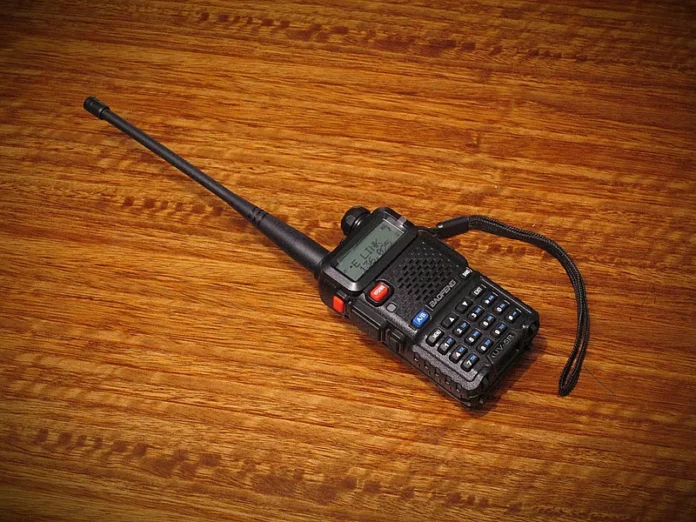
Walkie talkies have come a long way from their military roots and weekend camping trips. Today, they’re used by event coordinators, delivery drivers, security teams, and warehouse crews—anywhere fast, reliable voice communication matters. But for many users, especially those new to these devices, the buttons, screens, and beeping noises can feel like they belong in a cockpit.
If you’ve ever looked at a walkie talkie and thought, “What do all these buttons actually do?”—you’re not alone. The good news is, you don’t need a tech background to understand how these devices work. Let’s break it down in plain language.
The Basics: What You’re Looking At
When you pick up most modern walkie talkies, you’ll see three main things:

- A button on the side (usually big and easy to press)
- A small screen
- A few extra buttons on the front or top
Each of these serves a simple purpose. The side button? That’s the “talk” button. Press it, speak, release it to listen. That’s the heart of how walkie talkies work, and it’s called “Push-to-Talk” (PTT).
The screen and other buttons are there to help you change channels, adjust the volume, or check battery life. You’ll use them occasionally—just like you might press a home button or volume rocker on your phone.
Push-to-Talk: The Only Button You Really Need
The reason walkie talkies are still popular—despite smartphones—is because of how easy it is to communicate. No swiping. No calling. No waiting for someone to answer. Just press, talk, let go.
This simplicity is intentional. In busy environments like warehouses or construction sites, you don’t want to fumble with menus. You want instant communication. That’s exactly what Push-to-Talk offers.
Channels: Think of Them as Group Chats
Walkie talkies typically operate on channels. These are like different chat rooms. If you and your team are on the same channel, you can talk to each other. If someone else is on a different channel, you won’t hear them.
Changing channels is usually done with a small knob on top or through a quick tap on the screen. Once you’re on the right one, you’re good to go. Some devices even name the channels so you don’t have to remember a number—like “Security,” “Front Desk,” or “Team A.”

Screens: Small but Mighty
Don’t be intimidated by that little screen. It’s not there to complicate things. Most modern walkie talkies use the screen to show:
- What channel you’re on
- Your battery level
- Whether you have a signal (for nationwide models)
- Who last spoke (some models show a name or ID)
If it looks like a mini dashboard, that’s because it is. But it’s not designed for deep menus or settings. Most people never touch anything beyond channel and volume.
Extra Buttons: Shortcuts, Not Surprises
Some walkie talkies include a few extra buttons, but they’re usually shortcuts to useful features:
- Volume up/down
- Emergency alert (for safety situations)
- One-touch call to a supervisor or group
You can think of these like the shortcut buttons on a car steering wheel—useful if you want them, easy to ignore if you don’t.
Walkie Talkies with Nationwide Coverage
There’s one more innovation that makes today’s devices easier than ever: some walkie talkies now work over 4G networks, just like smartphones. This means no range limitations and no need to worry about signal towers. And yet, the interface stays just as simple: a PTT button, a channel, and a screen. That’s it.
This kind of modern walkie talkie is especially helpful for teams that work across multiple locations or even states. With the same simple interface, you can talk to your team whether they’re next door or a thousand miles away.
Final Thought: Built for Humans, Not Engineers
You don’t need to decode tech manuals to use walkie talkies effectively. In fact, their entire design philosophy is built around speed, simplicity, and reliability. Once you get past the initial unfamiliarity, using one becomes second nature—like flipping a light switch or answering a phone.
So next time you see a device with a screen and a few buttons, don’t overthink it. If you can push a button and talk, you’ve already mastered the basics.